


A little less paper. A little more connection.

Scan a card.
Find the contact later.

Scan. Organize. Search. Less shuffling through cards when it is time to reconnect.

DEMO STUDIO / TAIPEI Meiru Chen Sales Director hello@example.com
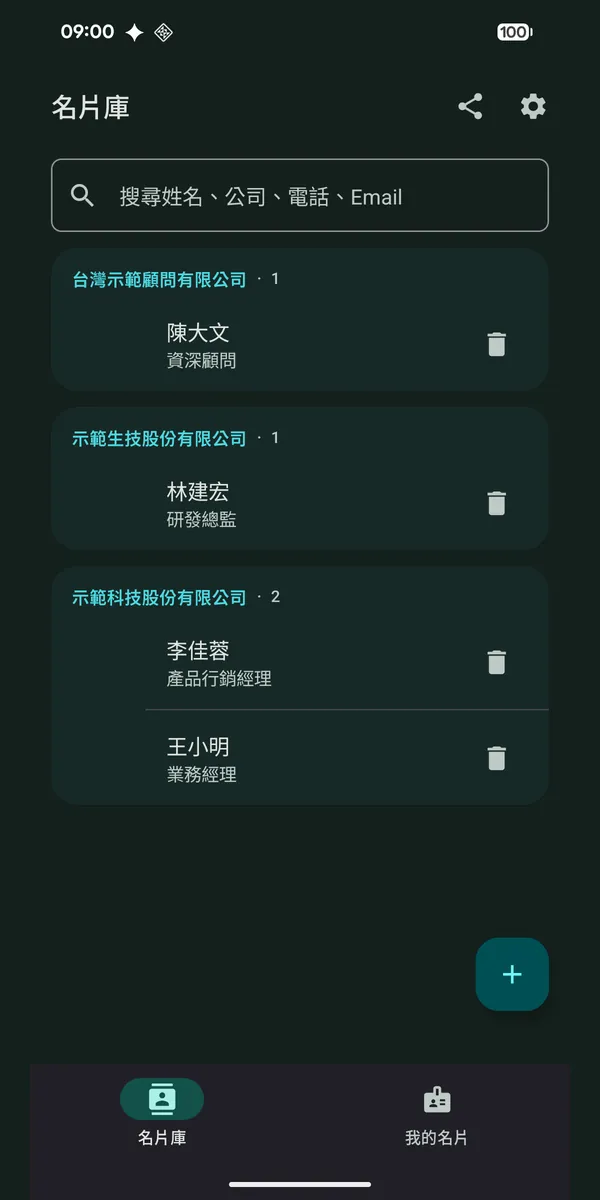
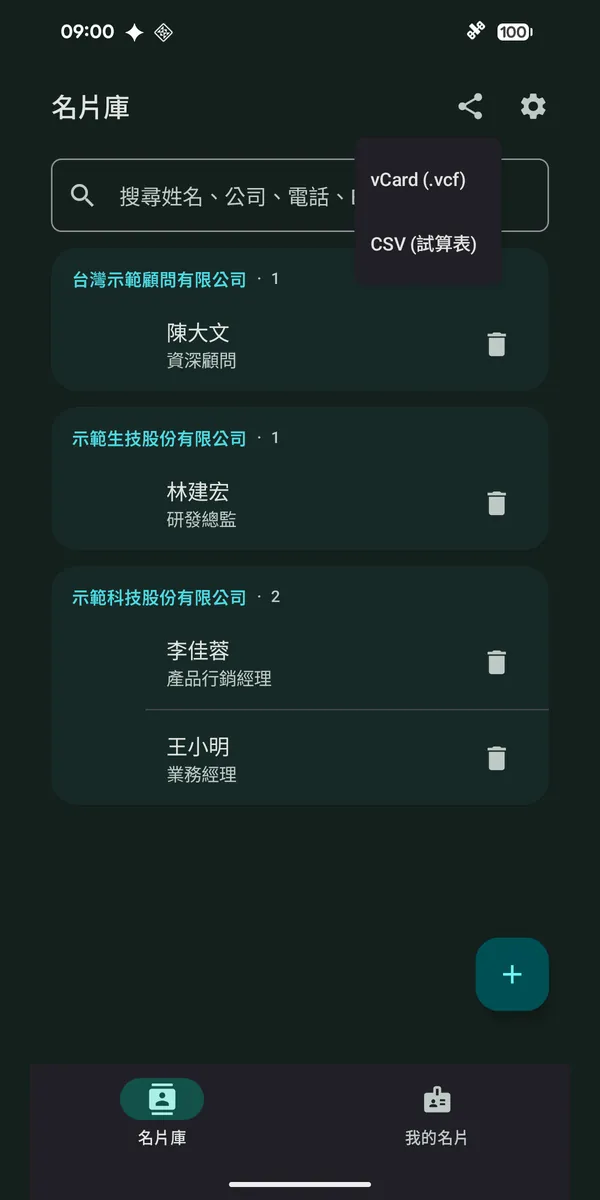
Real Pianke Android library: contacts grouped by company, with search by name and company.
A card, ready to find
Meiru ChenDemo Studio · Sales Director
Expo contactSearch by company
Card → contact illustration · Android screen with demo data
Get it on Google Play Download on the App Store
Scan with your phone to download

Free download · Keep up to 15 cards
Need more? Pro is a one-time purchase.

Android sale: Pro about 20% off, until Dec 31 Follow a card’s journey
01 / A card in your hand

Point at a card. Pianke does the rest.

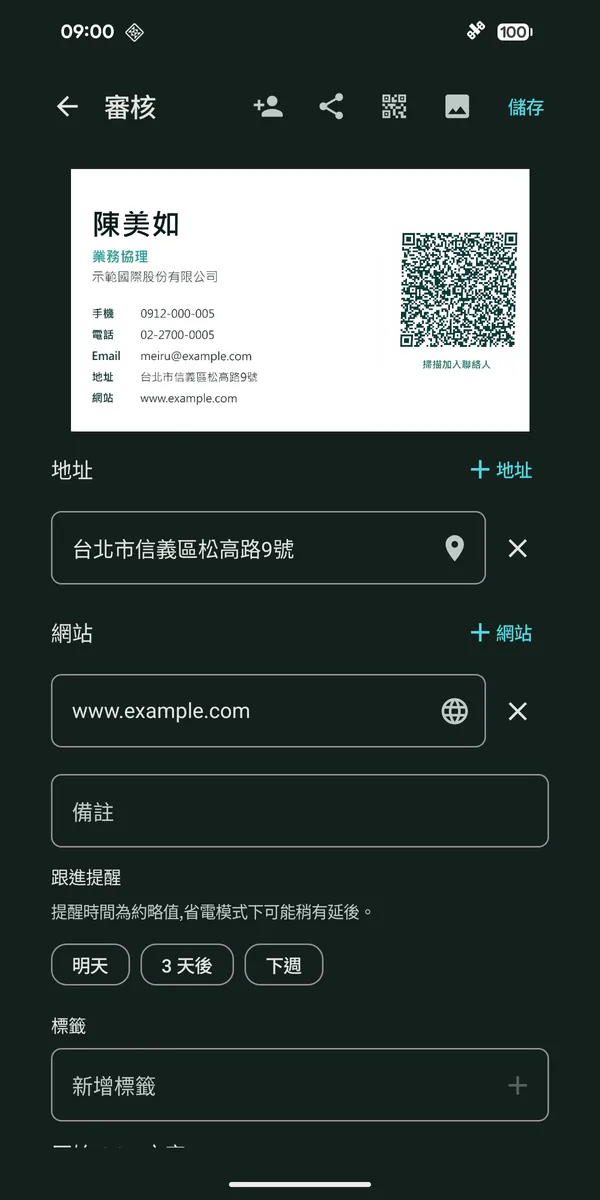
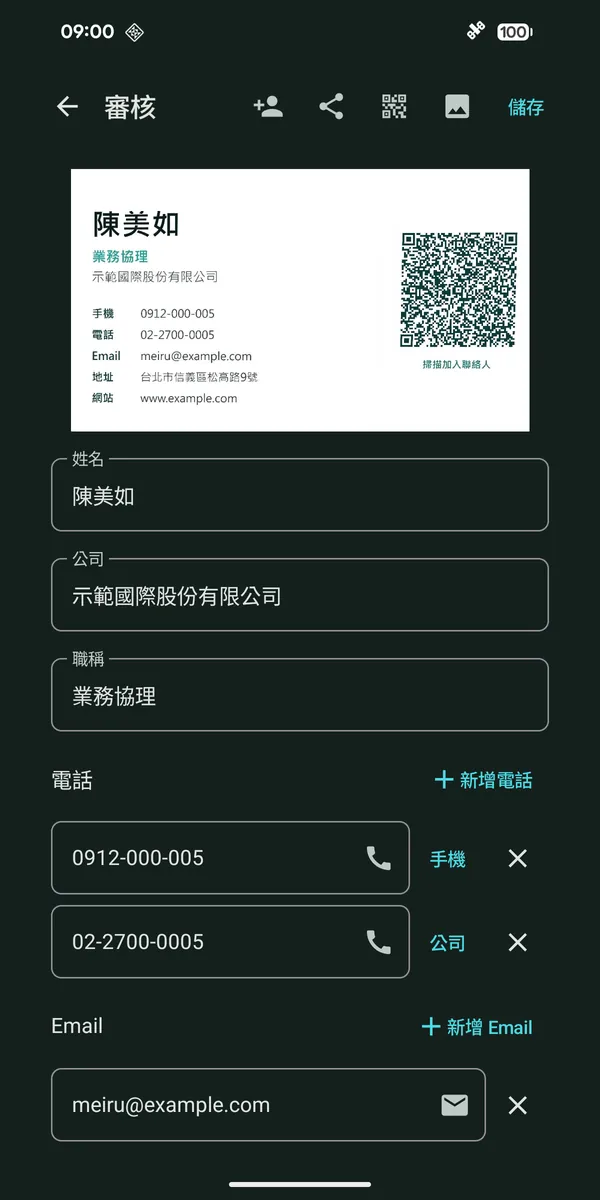
It auto-detects the edges, straightens the image, then recognizes the text and parses it into fields — all on-device. Got it wrong? Just edit, or fix the raw text and re-parse.

  • Name, company, title, phone, email, address, website in one pass
  • Phones auto-typed: mobile / work / fax
  • Edit the raw OCR text, then re-parse
Review screen: the demo card image on top, with the address and website filled in from the card's QR code
02 / Find the person again

Remember the company. Find the person.

The library collects colleagues from one company into a single card, so your network reads at a glance. Search instantly by name, company, phone, email, or your own tags.

  • Auto-grouped by company; blank ones go to “No company”
  • Custom tags (VIP / client / vendor), searchable
  • Long-press to multi-select for batch actions
Card library: cards grouped by company, with a search bar on top
03 / Keep the conversation going

You met.
Remember what comes next.

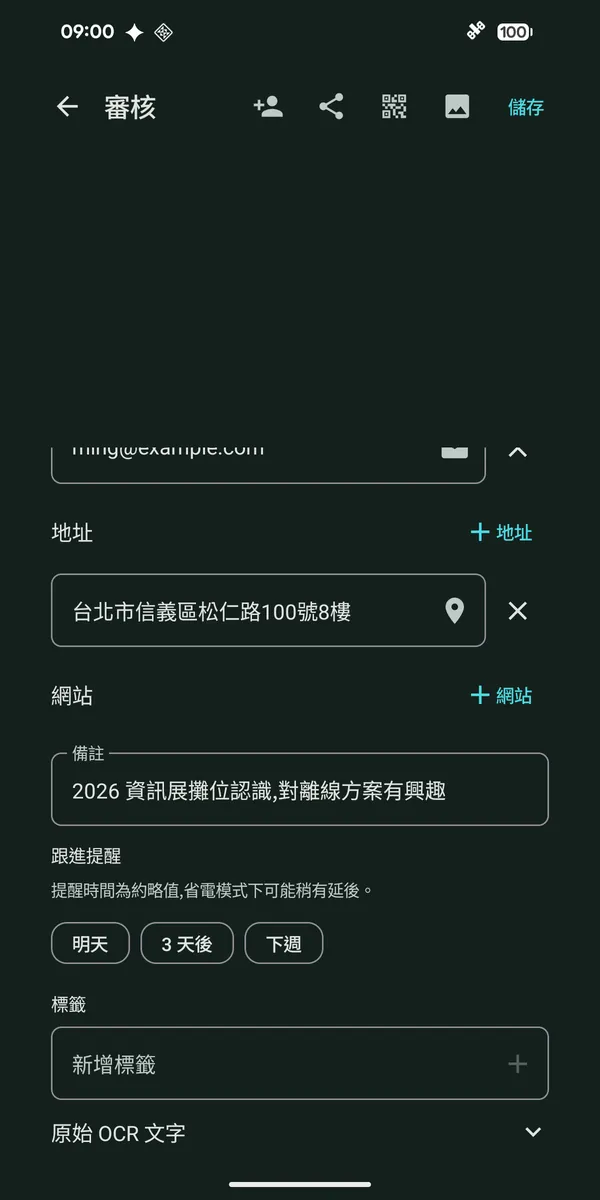
Add a note about where you met and what you discussed. Set a follow-up reminder, so the next conversation starts with a little context.

A note to your future self

Met at the expo. Send the product introduction next week.

Illustrative note · demo data
Real Pianke Android screen with note field and follow-up reminder options, using demo data.
Take it anywhere

Organized — now export it anywhere.

Pianke doesn’t lock you in. Hand your contacts to the tools you already use, through one standard file.

Save to Contacts

One tap into your system contacts — no permission, no account.

vCard export

A .vcf that imports straight into Google or Outlook contacts.

CSV spreadsheet

Export the batch as a table; opens in Excel or Sheets.

Local backup / restore

Keep a backup file yourself; restore it on a new phone.

Real screens

Open it and start.
There is no sign-in screen.

Real Android screenshots, with demo data.

Video

Pianke in 36 seconds.

Real app screens with demo data. On-screen text is in Chinese.

More videos on YouTube: @PiankeCard

How it works

A stack of cards to a contact library, in three steps.

  • NameMeiru Chen
  • CompanyDemo International Co., Ltd.
  • TitleSales Director
  • Mobile0912-000-005
  • Emailmeiru@example.com

Illustration with a made-up demo card. In the app this all happens on your phone, offline.

STEP 01

Scan

Tap +, point at a card. It auto-frames and straightens — or import an old photo from your gallery.

STEP 02

Review

Fields are pre-filled — confirm or tweak; a likely duplicate contact is flagged for you.

STEP 03

Export

Save to Contacts, or export vCard / CSV to any tool. Whole batches too.

More

The details, handled.

Dark mode

Light / dark / follow-system, switch anytime.

Duplicate detection

Scan the same person again and it warns before saving.

Drafts never lost

Leave mid-scan? Your draft is kept for when you return.

Built for Traditional Chinese

Parsing and layout tuned for Taiwan business cards.

0bytes of your cards uploaded
0internet permissions (Android)
0accounts to sign up for
US$14.99Pro, one-time · no subscription
Why Pianke

Your cards stay under your control.

Recognition and storage happen on your phone, with no automatic upload or account. Android does not request internet permission; sharing and backups use files you choose to export.

How on-device processing works (Android)
Android · on-device processing
Camera→on-device ML Kit OCR→rule-based parse→local Room DB
# share contacts by exporting vCard / CSV yourself
↑ bytes uploaded: 0 · network requests: 0 · accounts: none
100%on-device recognition & storage
CN · ENoffline OCR support
What's new
NEW2026.09Pro

Card Report
Back from the trip, report done in one tap.

Pick the cards from a trip and Pianke assembles a trip / visit report — on your phone, like everything else. Nothing is uploaded.

  • PDF + CSV in one go: the PDF to file or forward, the CSV for Excel or your CRM
  • Card photos (front and back), contact details, per-company stats and a summary
  • Preview it in the app, then share or save it to a folder
Android 1.5.2+ · available iOS 1.4.7+ · available

A Pro feature; the free version makes a watermarked preview.

9:41▮▮▮ 100%
Report preview
Trip report
Sep 15–18, 2026 · Tokyo expo
12cards
7companies
COMPANIES
TSMC3
HTC2
5 other companies7
CONTACTS
David Wang
Sales Manager · TSMC
Yen-Ting Lin
Sr. Firmware Engineer · HTC
SaveShare PDF
  1. 2026.11

    Sharper reading: English names and US addresses

    An English name printed on the same line as the Chinese name now fills the English-name field, and US-style addresses (such as 200 Harbor Way, Suite 8, San Francisco, CA 94105) are read as the address.

    Android 1.5.10+ · available
  2. 2026.10

    Share a card to LINE

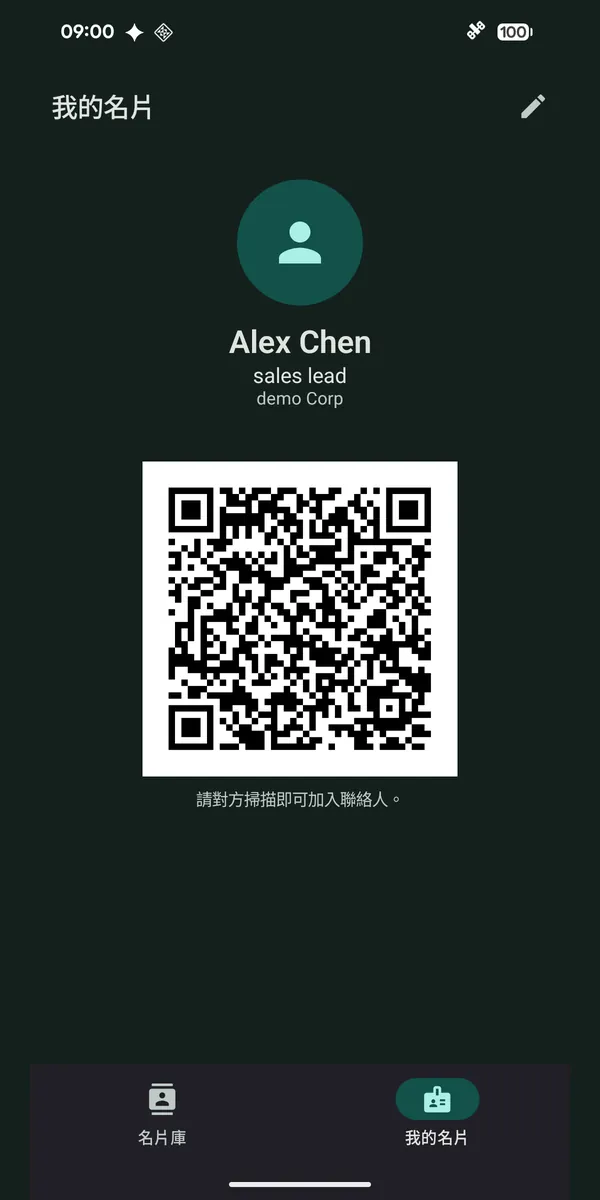
    A card goes into LINE as plain text, readable on any phone, and My Card can be sent to someone who is not next to you. Only contact details go; your notes and tags stay put.

    Android 1.5.3+ · available
  3. Open contact files and backups

    Tap a vCard (.vcf) or CSV file in the Files app, or one sent to you, and choose Pianke: it shows a preview before importing. A Pianke backup file opens the same way to restore.

    Android 1.5.6+ · available
  4. Move in from another app

    A card someone sent you in LINE becomes a card here when you share or paste it, and vCard / CSV files (Google Contacts, Outlook and other card apps) can be imported, with duplicates skipped.

    Android 1.5.5+ · available
  5. English name · tag in bulk

    Bilingual cards keep the English name in its own field; tag or untag many cards at once; unconfirmed cards sit at the top, and each card shows its tags in the list.

    Android 1.5.4+ · available iOS 1.4.8+ · available
  6. Add on LINE · licences · extensions

    Add someone on LINE from the ID on their card, or open WhatsApp from a mobile number; licence numbers get their own field, and extensions stay with the phone number and are dialled for you.

    Android 1.5.5+ · available iOS 1.4.9+ · available
  7. Voice notes · events · follow-up templates

    Dictate a note, recognised on the phone and never uploaded (Android 12+); set a current event and new scans are tagged with it; keep follow-up messages as templates; and search with a plain sentence such as 'last week expo'.

    Android 1.5.5+ · available
  8. 2026.10

    Now on iPhone and iPad

    Offline recognition, company grouping, tags, two-sided and batch scanning, encrypted backup — all on iPhone and iPad. Backups move between Android and iOS, so switching phones is painless.

    iOS 1.4.6+ · available
  9. Tax ID field

    The company tax ID is picked up while scanning, is searchable, and goes out with vCard and CSV exports.

    Android 1.4.6+ iOS 1.4.6+
  10. Tag management

    Tag cards as client, vendor and so on, then filter by tag. Add, rename, delete and reorder tags.

    Android 1.4.0+ iOS 1.4.6+
  11. Two-sided cards · batch scan (Pro)

    Front and back merge into one contact; shoot a whole stack in a row and each card gets its own draft.

    Android 1.3.0+ iOS 1.4.6+
  12. Tap the card to fill a field

    While reviewing, tap text on the card image to drop it into the right field — no retyping.

    Android 1.1.0+ iOS 1.4.6+
Pricing

Free to download.
The core is free.

When your stack of cards grows, upgrade to Pro once — no subscription, ever.

Free

Freeno time limit · no ads

Download it and use it — the everyday tools are all here.

  • On-device OCR and field parsing
  • Save to your phone's contacts
  • vCard and CSV export
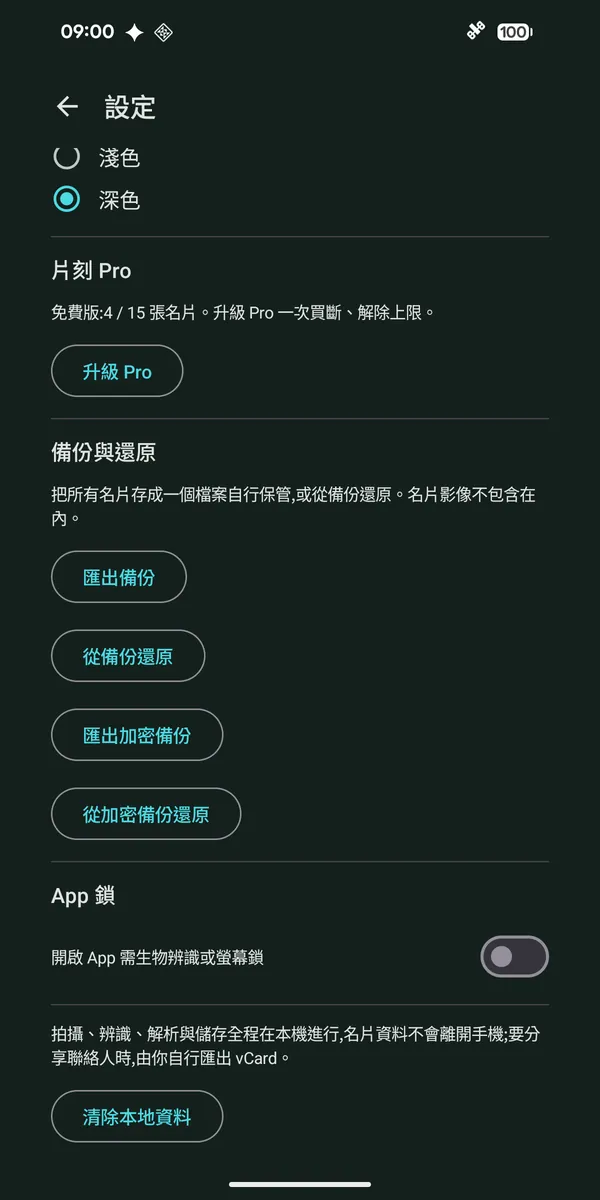
  • Backup and restore, App Lock, dark mode
  • My Card QR to share (one identity)
  • Keep up to 15 cards
  • Fully offline, no account

Pro Lifetime

US$14.99one-time · no subscription

Android sale: about 20% off until Dec 31.iPhone stays US$14.99.

Everything in Free, plus:

  • Unlimited cards
  • Batch scan: shoot a whole stack in a row
  • Two-sided cards, merged into one contact
  • Card Report: PDF + CSV (free makes a watermarked preview)
  • Several My Card identities

Privacy is never a paid extra: Free and Pro are equally offline, upload-free and account-free.

Store price may vary by region.

How it differs from subscription card apps

Every app does things its own way; this is the typical picture.

Full comparison (in Chinese)
片刻 PiankeSubscription card apps
PaymentPro once, US$14.99Typically renews yearly (or monthly)
Where your cards liveOn your phoneTypically uploaded and synced to a cloud
AccountNot neededUsually required
Ads / trackingNoneVaries by app
FAQ

Questions, answered.

Not covered here? See the support page.

Does Pianke upload my cards?

No. Scanning, recognition and storage all happen on your phone. The Android app doesn't even request the internet permission, and the iPhone / iPad app contains no networking code at all.

Do I need an account?

No. Open the app and start; there is no sign-in screen.

With no internet permission, how do I buy Pro?

Google Play or the App Store handles the purchase itself, and the app never sees your payment details. After a new phone or a reinstall, tap “Restore purchase” with the same store account to get Pro back.

How do I move my cards to a new phone?

Export a backup file in Settings (plain, or encrypted with a password) and import it on the new phone. Backup files work between Android and iPhone / iPad, and you keep the file yourself.

What does the free version include?

Free keeps up to 15 cards, and every core feature is included. Pro is a one-time US$14.99 that removes the limit — not a subscription. Store price may vary by region.

Does Pro carry over between Android and iPhone?

Sorry, it doesn't. A purchase belongs to the store account it was made with, so Pro bought on Google Play doesn't unlock the iPhone / iPad app, and vice versa. Your cards can still move over with a backup file.

Which devices and card languages are supported?

Android 8.0 or later, and iPhone / iPad on iOS 17 or later. It reads Chinese and English cards, recognized offline on the phone.

Get started

Try your first card for free.

Download Pianke, scan a card and check the recognized details before saving. Keep up to 15 cards for free; upgrade to one-time Pro when you need more.

Get it on Google Play Download on the App Store
Scan with your phone to download

Android 8.0+ · iPhone / iPad on iOS 17+ · Free download, one-time Pro (no subscription) · No ads · No tracking